SGMC: tools that work for volunteers
A website the committee can edit, ticket sales and practical tools for members. One connected platform for the people who keep a choir running.
Built around the people running the choir
A choir has several audiences: people thinking of joining, audiences buying tickets, members preparing for rehearsals, and the volunteers keeping everything organised. Each needs a clear way to do their part.
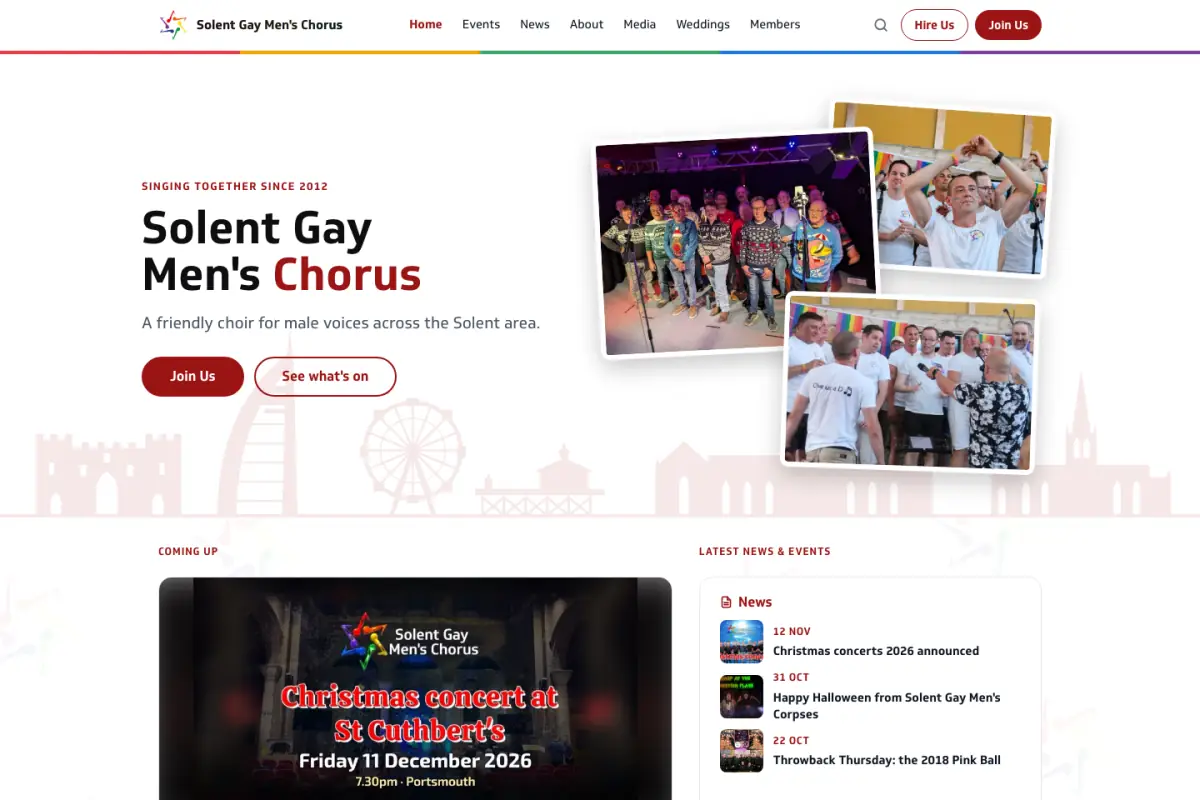
I built a connected set of tools for Solent Gay Men's Chorus: a public website, an editing system, ticket sales, a members' area, a music library, email lists and the official record of the choir's policies.
A website the committee can look after
The committee can update pages, share news and advertise concerts through an editing system. Concert pages have their own pictures and descriptions when shared in a message.
They only post once. A new post on the choir's Facebook page writes its own news article on the website: the headline, the text, the photographs and a one-line summary written by AI. New YouTube videos appear on the media page by themselves. Videos from Facebook and YouTube play on the choir's own pages, so nobody is sent away to watch.
Photographs and documents are kept in cloud storage, not on the web server. Anyone can view them, but only a signed-in committee member can add, change or remove one. When a picture is uploaded, AI works out what it shows, then writes a description for people who cannot see it and a short caption. The website uses that to choose photographs that suit each page.
Tickets are paid for through a card payment service, which charges its own fees; the application does not add a separate ticketing platform between the chorus and its customers.
Everyday jobs in one place
Members can report a rehearsal absence, give their availability for concerts, update their details and request uniform. Each concert has a call sheet with the call time, dress, parking and running order, and a change can be emailed to every member.
The committee manages the member list in one place. Two email lists, one for the committee and one for all members, take their recipients from that list every time a message is sent, so there is no second list to keep up to date.
A shared sign-in service supports email links and passkeys. Access depends on the person's role, so member information and committee tools have different permissions.
Music that fits the screen
The choir's music application brings together scores, set lists and learning tracks. Members can write on their sheet music, and keep their marks private or share them with chosen voice parts.
A score uploaded from music notation software is laid out afresh to fit whatever screen it is read on, with the member's own part shaded.
Only a signed-in member can open the choir's sheet music or play its learning tracks. Both are kept in private storage with no public address. The app checks who is asking, then sends the file itself.
It is live now, running alongside the service it replaces until the choir moves over.
One official record of the choir's policies
The choir's constitution and policies live in a governance portal, and that portal is the official record. A trustee proposes a change with a note of what changed and why, and links it to the meeting that will consider it. A second trustee has to approve it before it goes live.
Every approved version is kept, with who proposed it, who approved it, when, and at which meeting. No more separate documents on separate computers.
What this makes possible
The platform gives the choir ways to manage its own information and routine tasks, with the website and member tools connected rather than treated as separate jobs.
If you help run a charity, the starting point can be just as practical: one task that takes too much chasing, or information people struggle to find. We can start there.
What I did here
-
IT, infrastructure and governance
Get your systems working reliably, protect your information and put practical policies in place.
-
Websites you can update yourself
Change the words and photos yourself.
-
IT and governance support for charities
Support for your people, systems and trustees, from someone who understands charity life.
-
Payments and ticket sales
Take deposits, sell tickets and get paid.
-
Email security
Stop people sending fake email from your address.
-
Hosting and care
I keep it online, secure and up to date.
For IT people: how it is built
A bespoke website and connected applications for a volunteer-run choir.
- Payload CMS on Next.js, with PostgreSQL and a separate Vite public frontend.
- A shared Node.js and SQLite identity service supports magic links, passkeys and role-based access, and holds the member list.
- The member portal integrates with the identity service and CMS for profiles, absences, availability, call sheets and uniform requests.
- Stripe checkout and signed payment webhooks support ticket orders.
- Media and documents are stored in Backblaze B2 through Payload's S3 storage adapter and served from a CDN address. The files are public to read. Writes go through the CMS, which holds the storage key and accepts uploads only from a committee sign-in.
- Each uploaded image is tagged, described and captioned by a Claude model with structured output. The tag list is fixed, and the frontend picks photographs by tag.
- A scheduled job reads the Facebook page through the Graph API and creates news items: the headline is taken from the post's first line, the photographs are copied across, and Claude writes the one-line summary when it is left blank. YouTube uploads come from the YouTube Data API, with the channel's Atom feed as the fallback. The page's own Facebook videos play in a native video element from the file Facebook supplies; YouTube plays through its no-cookie embed.
- The mailing lists are a small Node.js mail service. It checks SPF, DKIM and DMARC, checks the sender is on the committee, and reads the recipients from the identity service for each message.
- The music application is Fastify, React and SQLite. MuseScore files are converted to MusicXML on the server and engraved in the browser by Verovio; PDFs are shown with PDF.js.
- Scores, PDFs and learning tracks sit in a private Backblaze B2 bucket, separate from the website's public one. The application checks the member's session and role, then streams the file from the bucket itself, so no storage address or signed link ever reaches the browser.
- Constitution and policy changes follow a two-trustee approval workflow in the CMS. Each approval writes a numbered snapshot linked to the meeting record.
- Public content is prerendered for search engines and link previews. GitHub Actions workflows define builds and deployment.
- The interfaces include skip navigation, labelled controls and reduced-motion support.
-
Payload CMS
Payload CMS developer in the UK. I build and run production sites on Payload, including a charity's whole platform of five Node services on one server.
-
Email authentication
DMARC p=reject setup with SPF and DKIM aligned, without losing legitimate mail on the way. In production for a charity and for this domain.
-
Passkeys and single sign-on
Passkey login and single sign-on: one identity service for every app, with WebAuthn, OIDC and roles that match how the organisation works.